Good morning, network nerds! Welcome to Routing Week 1!
We made a lot of good progress since my last post. I have a lot of good structure built out in my study plan and some great resources, at least to get started with. Something you’ll learn as you follow this series is that I have a pretty terrible recall memory. This leads me to writing down and documenting everything in my life that I actually want to remember. This is also why my girlfriend gets regularly peeved at the fact that I can’t remember what food we have in the fridge or pantry (I don’t write that down). At work I have upwards of a dozen small lists and sticky notes on my desk to accompany my ever expanding archive of what I’ve coined “network information documents” – or simply notes documenting anything from BGP ASs to known services to learned fixes. All of this to say: we’re going to reference the NSE8 Tracker spreadsheet a lot.
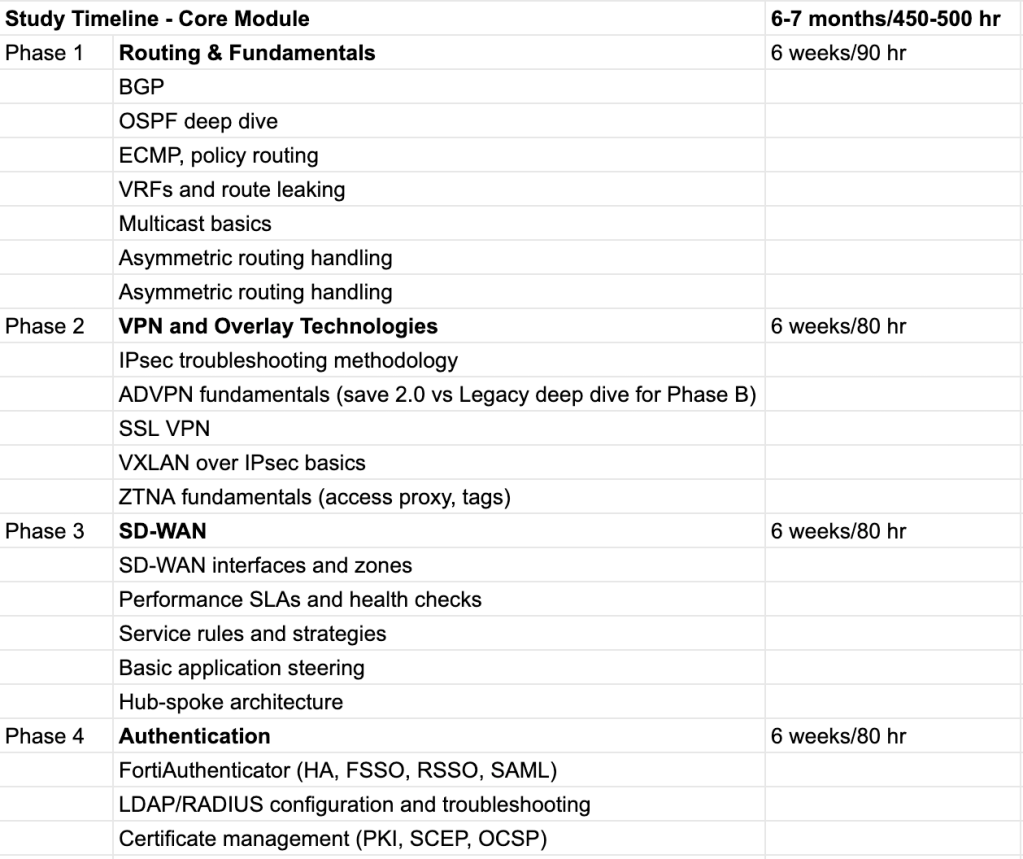
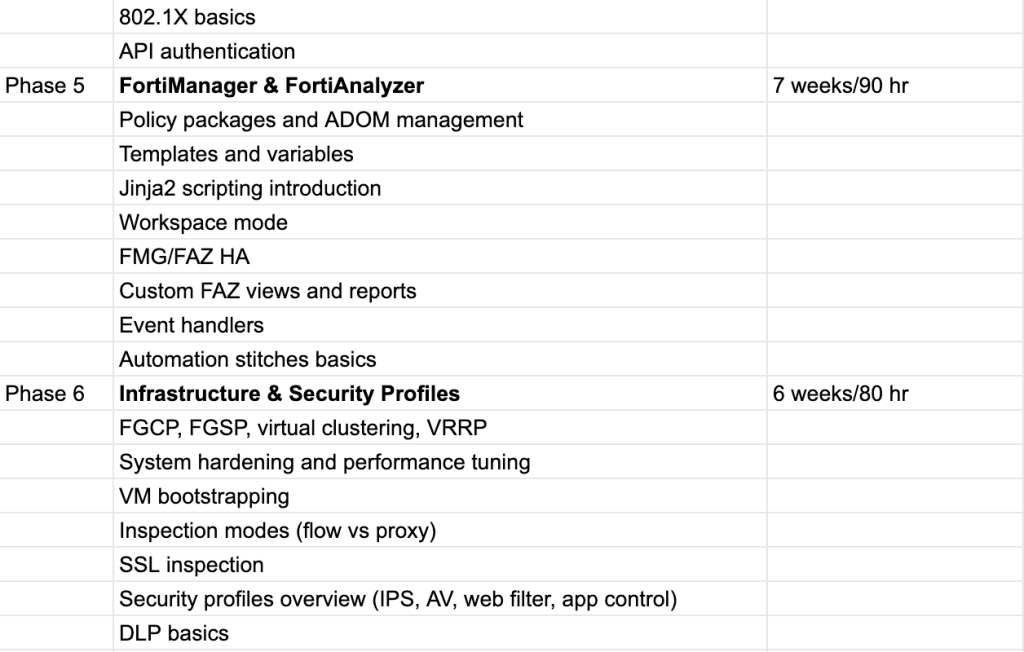
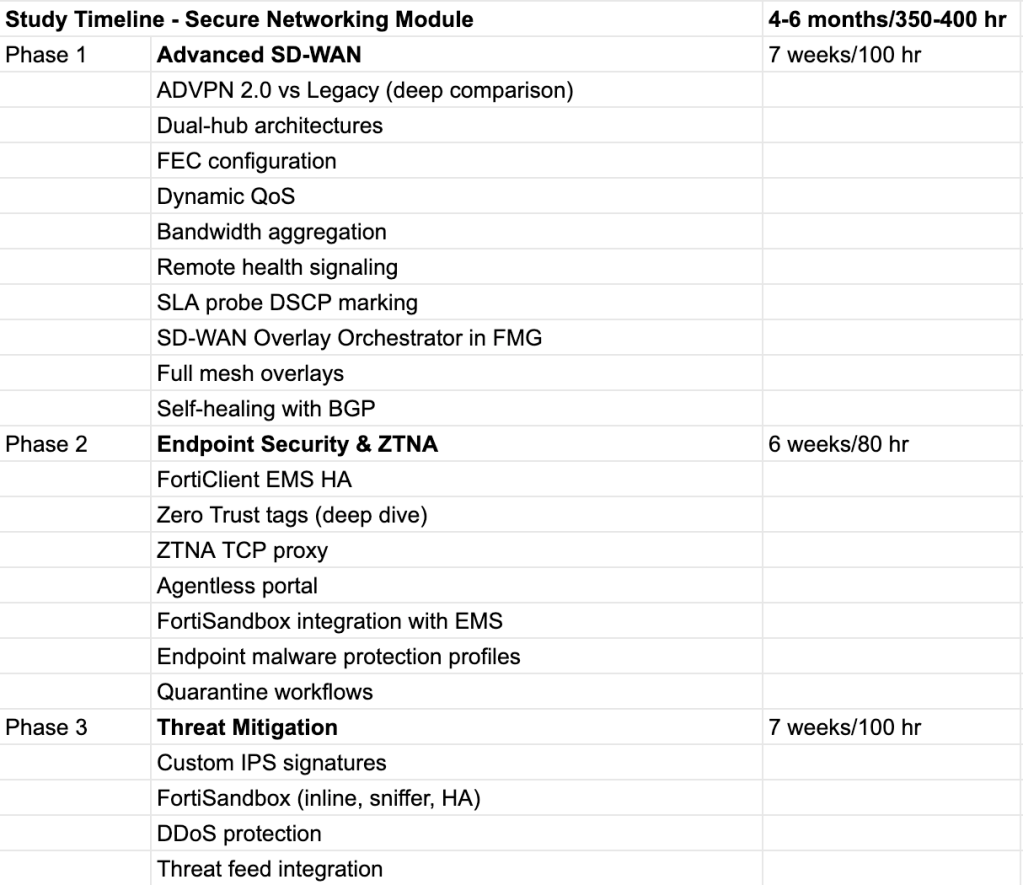
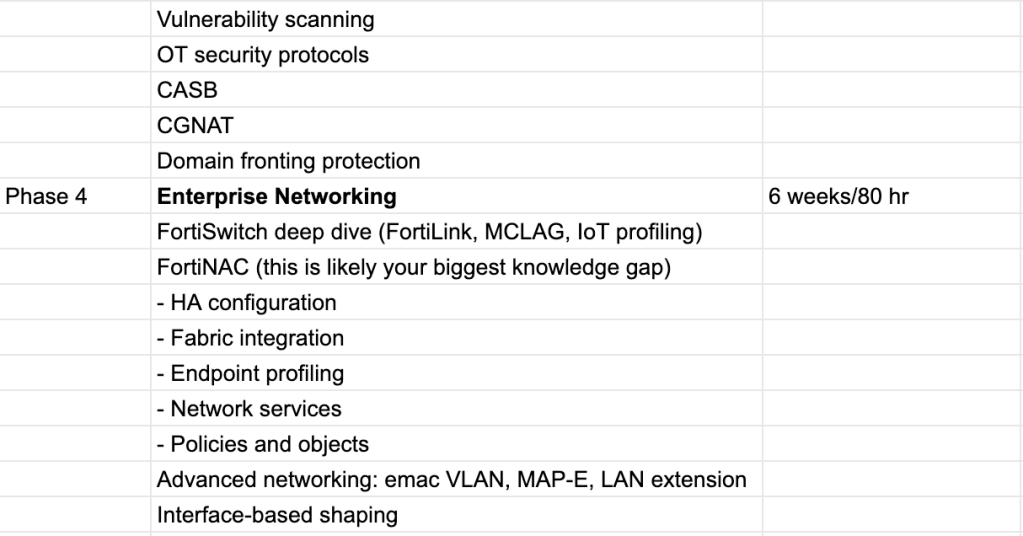
The Study Timeline
First off, for background here, I created this outline with Claude AI. I gave it the NSE8 Pre-Release PDF, and some context on my available time per week and network experience. It produced these two timelines for the NSE8 modules. I certainly won’t be sticking to these exactly, but they provide a basic structure to go off of.
The Lab (so far)
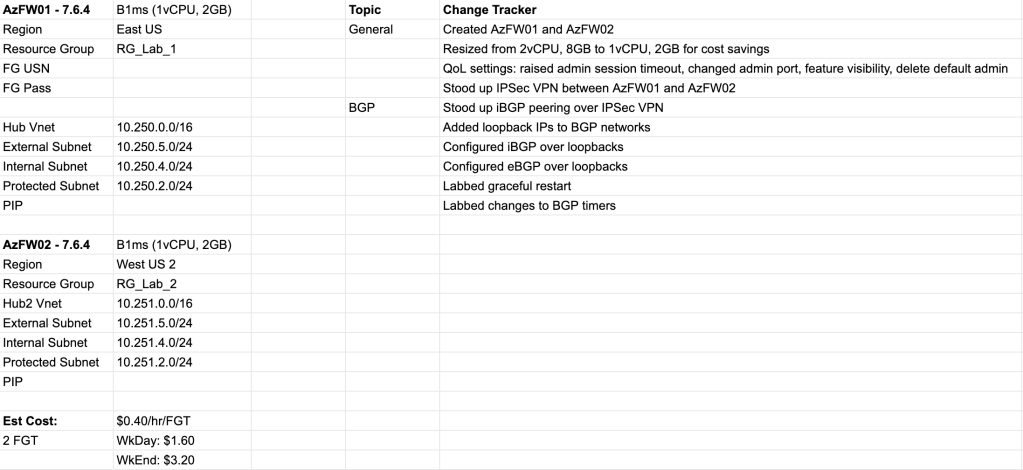
If you read my first blog post you’ll know that I have a small FortiGate/FortiSwitch/FortiAP stack at home. Unfortunately this simply isn’t going to cut it for the NSE8. It was great for the FCP and FCSS, but there’s simply too many additional products (FortiManager, FortiAnalyzer, FortiClient EMS, etc.) to keep things remotely physical. Virtualization is required. The ability to quickly spin up additional FortiGate instances to act as routing or IPSec peers is already enough of a QoL boost to justify learning the bit of cloud or hypervisor skills required.
To summarize the screenshot above, I stood up a couple of FortiGate VMs in Azure. I made an IPSec tunnel between them and started labbing out the BGP concepts I’ve been going deep on this past week. So far I’ve just been using the PAYG (pay as you go) licensing model for the FGT VMs, but I’m hoping to swap these with BYOL (bring your own license) versions once our Fortinet AM (Account Manager) finally responds to my email. Oh, that!
On Monday, I shot an email off to our company’s Fortinet AM and SE (Sales Engineer) with a list of about 4 questions (see blog 4 for the list – it’s mostly specifics about FortiOS versions and past certs) and a request for some additional resources such as Fortinet Developer Network access and hopefully some evaluation licenses for all of the products included in the NSE8 syllabus. To be fair it was quite a few specific questions and asks… I’m sure they’ll get back this week. Until then I’ll stick with the PAYG, which is a maximum of 10 or 15 dollars a week with the 2 FGT VMs. I always make sure to shut these down after each lab session.
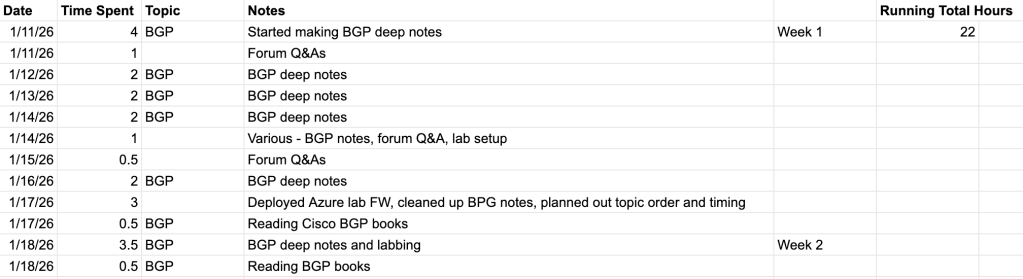
Time Tracker
I’m not sure if I’ll include these in each weekly blog post, but I do feel it’s personally valuable to know roughly how many hours I’ve spend on each topic. Another thing I’ve noticed about myself is that I have a problem with either going too shallow or deep on subjects (an extension of a general personality of extremes that falls outside of this blog’s scope). Documenting my time will give me a general idea as to whether I’m within range of my Topic Schedule. I also noticed that it keeps me more accountable with myself, just like this blog!
Additional Resources
To conclude I just wanted to mention a few additional resources that I may or may not have mentioned and have found valuable this first week.
- Claude AI – I’ve been using Claude Pro for about a year now for everything from gardening advice to career advice to vibe coding little dashboards for personal use. I used it extensively while studying for the FCS and FCSS, feeding it my typed notes to check for accuracy errors and knowledge gaps, as well as to create practice questions and practical scenarios. For the NSE8 I obviously used it for the Topic Schedule, but I’ve also been feeding it my BGP deep notes to check for accuracy and gaps and then asked it to provide me with different scenarios to lab out.
- draw.io – I use this to create all of my network diagrams. It’s easy to use, nimble, and most importantly, free.
- Google – This may be obvious, or not. The FortiOS administration guide isn’t enough, neither are the Fortinet Training site’s self-paced learning modules (like they were for FCS/FCSS). You have to reference Fortinet Community documents and Technical Tips. The best way to find these, I’ve found, is to simply search “fortigate [topic]”. For example, “fortigate bgp graceful restart”. Then I go through the first few pages and take notes on any and everything I haven’t learned yet. When I first start on a new subtopic I make sure to take notes but know that facts aren’t set in stone until I’ve either reviewed a couple corroborating sources or labbed it out myself. If you haven’t already, it’s also useful to quickly learn Google Dorking, which allows you to use Google better, simply put. Here are some quick tips on that:
- Put double quotes around any term you want your search to match exactly. For example if you want to absolutely be sure that that your search includes the phrase “denied by forward policy check” (See first image below). This is extremely useful when searching for specific logs or error codes.
- If you only want results from fortinet.com, include site:fortinet.com. (See second image).


Thanks for reading, see y’all next week!
 NSE8/FCX Certification
Leave a comment