BGP Basics
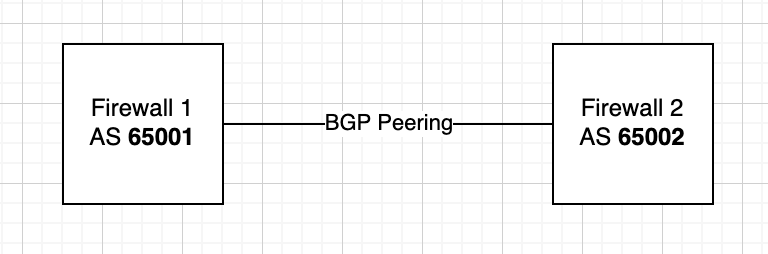
BGP is a routing protocol that shares routing information between peers, identified by their AS (Autonomous System) numbers. Peers are two or more networks that wish to share routing information.
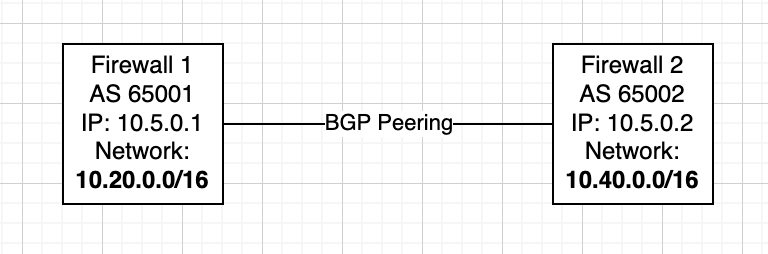
BGP Basic Peering Requirements:
- AS Number
- Peer IP
- (Advertised) Networks
AS Numbers
- Public AS Ranges: 1 – 64495
- These numbers must be unique when peering out into the public internet.
- You must register publicly with IANA to obtain an assigned number.
- Reserved AS Ranges: 64496 – 64511, 65535
- Private AS Ranges: 64512 – 65534
- These numbers may only be used within your private network (or eBGP peerings to other private networks) and may not be used when peering to the internet.
- Public Extended (4-byte) AS Ranges: 65536 – 4199999999
- Private Extended (4-byte) AS Ranges: 4200000000 – 4294967294
- Reserved Extended (4-byte) AS Ranges: 4294967295
Peer IP
A peer IP is used to identify the network you are peering with, particularly how you will reach it. For every peering, each peer will choose a Peer IP, typically one of two IPs within a /30 subnet.

(Advertised) Networks
Your networks are subnets configured within your BGP settings that may be advertised to your peers. These are commonly your local subnets that you’d like to provide your peer access to.
Connection Method
Every BGP peering occurs on top of a connection method. This could be a direct connection (an Ethernet cable connecting two routers), an IPSec VPN tunnel, an MPLS connection, or any way two networks can physically (or logically) connect. The BGP peering is not a connection in itself, like a VPN tunnel is; rather it shares routing information between those networks once they are connected.
IPSec Connection Method with eBGP Peering Example
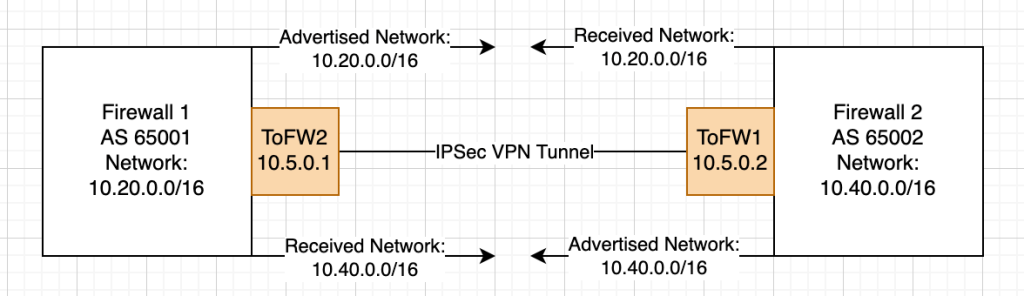
Here I’ve actually added two elements: the IPSec tunnel interfaces (ToFW2 and ToFW1) and the advertised and received networks, but let’s just focus on the former for now. The tunnel interfaces are virtual (logical) interfaces created when the IPSec VPN is stood up between the two networks. Within the interface configuration, from Firewall 1’s perspective we configure our IP (10.5.0.1) as well as a remote IP and subnet (10.5.0.2/30). From Firewall 2’s perspective we do the same, but with the values flipped (IP 10.5.0.2 and remote IP 10.5.0.1/30).
eBGP vs iBGP
- eBGP (External BGP) is used when peering with a different AS. This is most commonly seen when peering with a partner organization, peering to the internet (an ISP, provider network), or peering to a cloud network (ex. peering to an on-ramp to Azure Cloud).
- iBGP (Internal BGP) is used when peering within the same AS (internal to the same AS). This is most commonly used when sharing routing information internally – to other routers on your organization’s network.
Differences between eBGP and iBGP
- Major Difference – Route Advertisement Default Behavior
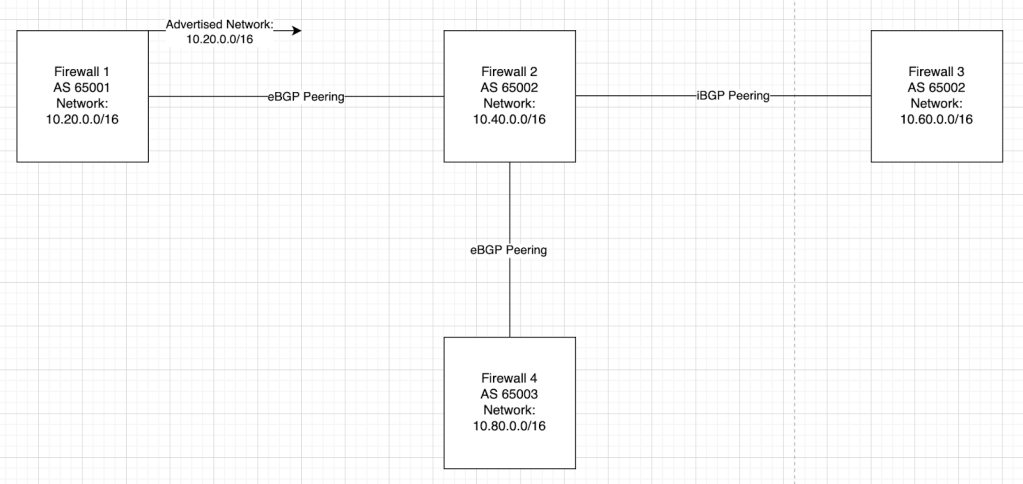
- Routes learned from iBGP peers are not automatically advertised to other iBGP peers, to prevent loops. By default, eBGP peers will advertise all of its configured networks and re-advertise all networks it receives from eBGP peers to its iBGP and other eBGP peers.
- Default eBGP behavior:
- Default iBGP behavior:

- Minor Difference – Next-Hop Behavior depends on Connection Method
- In iBGP, the remote peer IP is most commonly a direct connection. Therefore a route to the remote peer IP is created automatically.
- For instance, if the local IP is 10.5.0.1/30 and the remote IP is 10.5.0.2/30, there will be a route via direct connection to 10.5.0.2/30 via the directly connected interface.
- In eBGP, the remote peer IP may often need a route to be configured manually.
- This is not the case for a peering over an IPSec VPN tunnel with the remote IP configured on the tunnel interface. The FortiGate will automatically create a route to the remote IP when you configure the interface.
- If you are experiencing issues getting a peering to become established, check that you have a route in your routing table to the remote IP.
- Minor Difference – Policy Control Purpose
- Policy Control refers to the application of route maps, access lists, filtering, and preferences.
- In iBGP, Policy Control is typically used for the purpose of preventing routing loops and ensuring proper route distribution.
- In eBGP, Policy Control is typically used for the purpose of controlling which routes are shared between different organizations or WAN networks.
config router community-list
    edit <name>
        set type {standard | expanded}
        config rule
            edit <id>
                set action {permit | deny}
                set regexp <string>
                set match <string>
            next
        end
    next
end
Route Selection Process
Let’s say your FortiGate is peered with 2 different external networks and 3 internal routers. Your FortiGate receives the same 10.120.0.0/16 subnet from two different peers. Which peer (routing direction) will it prefer over the other? This is where the route selection steps come into play. If at any time one router “beats” another router, the route selection process stops and the winning peer is used for routing.
- Higher Weight
- The default weight is 0 for routes learned from BGP peers and 32768 for locally originated routes.
- Weight is a local only attribute and is never propagated to peers.
- It is typically not advised to use this to manipulate routing unless you’re looking to route your default 0.0.0.0/0 traffic via a BGP peer rather than a static route.
- Higher Local Preference
- The default local preference is 100.
- This is the most common attribute used to manipulate routing decisions.
- Local preference only applies to the local router. Therefore it should only be used to manipulate routing decisions outbound (preference or depreference a peer for outbound traffic).
- Prefer Route Originated by Local Router
- Routes created directly (ex. your BGP networks) on the FortiGate will be preferred over routes sourced from peers.
- Shortest AS Path
- Each router traversed to a final network destination is considered an AS hop.
- FortiGate will choose the path with the fewest AS hops, minimizing the number of networks traversed to reach the destination.
- Routes received by peers can be preferred or depreferred by “prepending” AS hops, or adding additional AS hops to a peer’s path. This is the most common method of preferring and depreferring received networks.
- Lowest Origin Code
- Only relevant if multiple dynamic routing protocols are in use.
- Routes learned through IGP (Internal Gateway Protocol) are prioritized over EGP (External Gateway Protocol) and incomplete (unknown origin) routes.
- Lowest MED
- The Multi-Exit Discriminator (MED) attribute helps control inbound traffic from external autonomous systems. FortiGate favors the route with the lowest MED if MEDs are exchanged between peers. MED can only pass between adjacent autonomous systems, meaning that it is not transferable through the Internet.
- Prefer EBGP Over IBGP
- Prefer Path Through Closest IGP Neighbor
- Only relevant if multiple dynamic routing protocols are in use.
- If multiple iBGP paths exist, FortiGate will prefer the one through the closest IGP neighbor (lowest IGP metric)
- Oldest Route for eBGP Paths
- Lowest Neighbor BGP Router ID
- Router ID is a manually assigned attribute within BGP settings on the FortiGate.
- Lowest Neighbor IP Address
- Neighbor IP address = Peer IP address
Route Selection Process – Manipulating Routes in eBGP
The list above is a great technical breakdown of how your FortiGate will choose the best BGP path. In practice, the following attributes are what are typically used to manipulate eBGP routing.
- Inbound/Received Routes
- These are the routes received from your peers.
- Set a higher or lower Local Preference to preference or depreference a route.
- Outbound/Advertised Routes
- These are the routes advertised to your peers.
- AS Path prepend the routes you wish to depreference.
iBGP Real-World-Use Disclaimers
- iBGP networks should be fully meshed in design and will auto-determine their best paths via the Route Selection Process.
- Route manipulation is not as common as it is in eBGP, but when it is necessary, Local Preference is typically used.
- iBGP is typically used in combination with another dynamic routing protocol such as OSPF.
- It is becoming more commonly recommended that smaller internal networks utilize a simpler routing protocol such as OSPF or EIGRP over iBGP.
- eBGP is most commonly seen on large and/or service provider networks, but eBGP implementations are more and more being recommended over iBGP for even small-mid-sized enterprise networks, especially within datacenter environments.
eBGP Route Manipulation via Local Preference and AS Path Prepending – Example
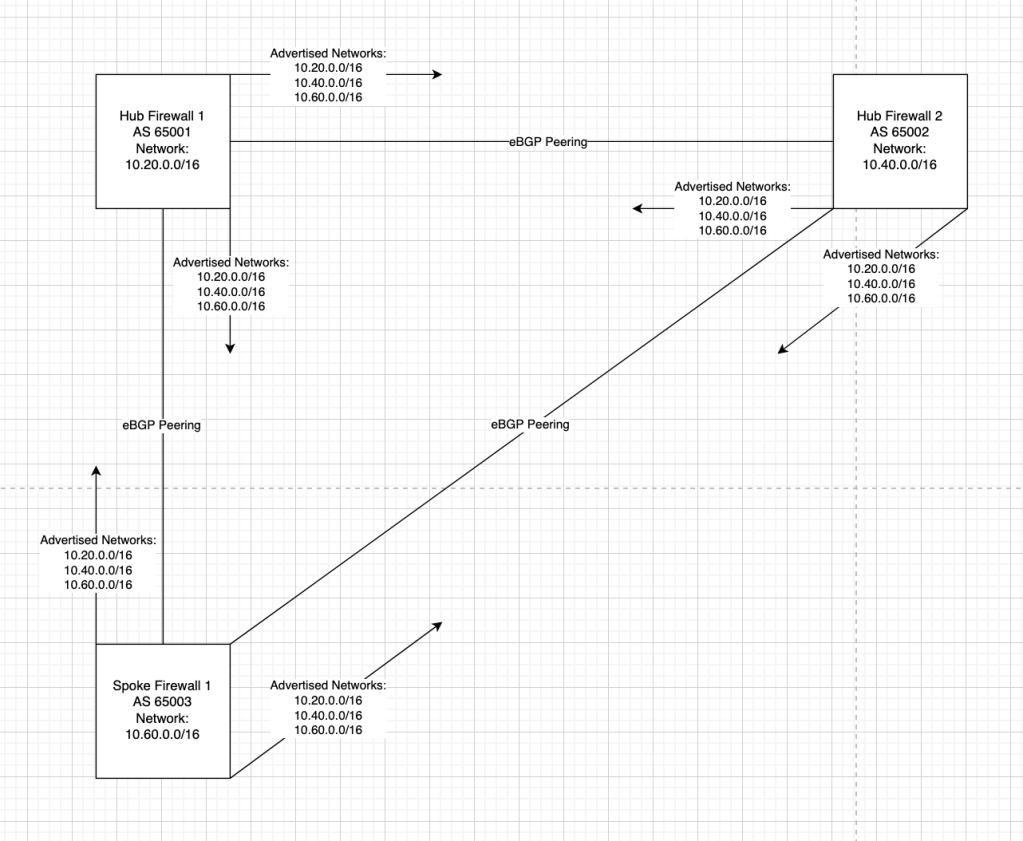
Let’s start with the above scenario. We have a dual-hub-and-spoke network design with a single spoke router. Functionally, a full mesh topology has been formed and routing will occur symmetrically. If Hub 1 needs to reach Hub 2 or Spoke 1, it will route directly over the direct connection.
Additionally, in this scenario, our stakeholders have asked that we steer all routing from Spoke 1 to Hub 1, even traffic destined for Hub 2. The reasoning behind this is that the link WAN between Spoke 1 and Hub 2 is extremely expensive and slow and should only be used as a backup (we will not address the backup routing in this scenario, for simplicity).
As stated in one of the sections above, we should use Local Preference and AS Path Prepending. Given the simplicity of this scenario we can exclusively use Local Preference if we want, but outbound route-map-out depreferencing via AS Path Prepending is the correct way. For the sake of brevity, this example will only use LP.
Step 1: Customize Local Preference attributes via Route-Map-In
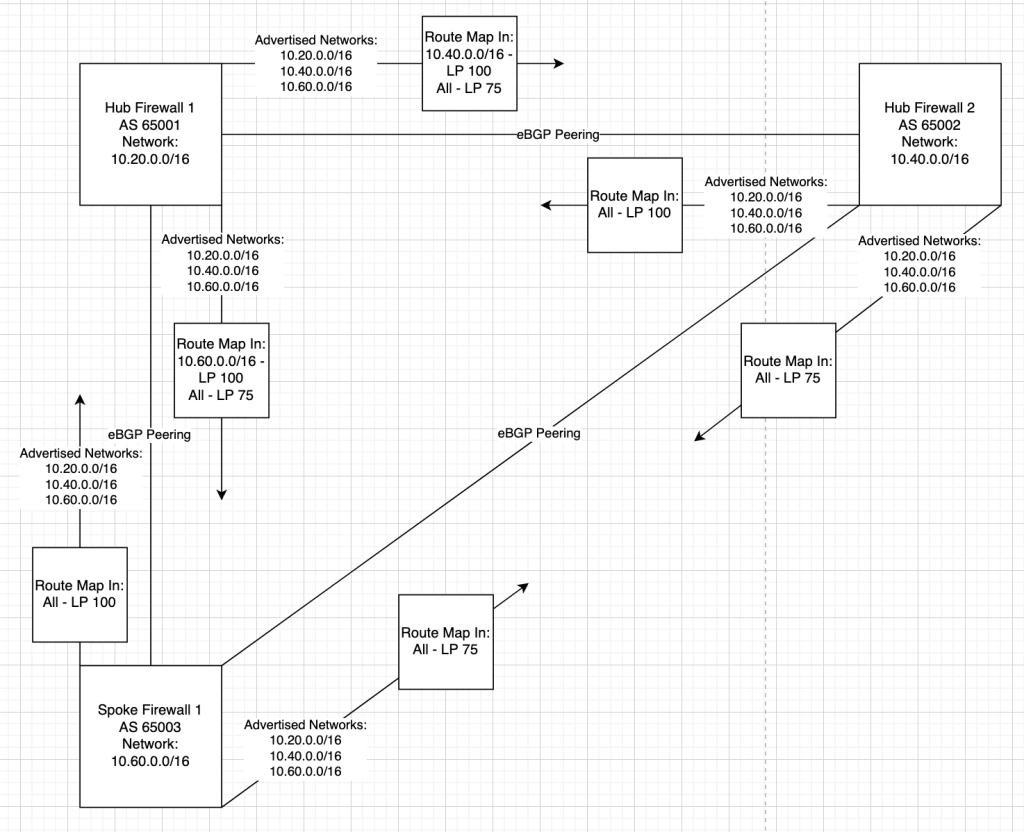
Route Selection Process, explained:
- Spoke 1’s perspective:
- All routes received from Hub 1 have a Local Preference of 100
- All routes received from Hub 2 have a Local Preference of 75
- All traffic to the 10.20.0.0/16 and 10.40.0.0/16 networks will travel to the Hub 1 next hop as preferred by Local Preference.
- Hub 1’s perspective:
- The 10.60.0.0/16 route received from Spoke 1 has a LP of 100
- The remaining received routes from Spoke 1, 10.20.0.0/16 and 10.40.0.0/16 have a LP of 75.
- The 10.40.0.0/16 route received from Hub 2 has a LP of 100
- The remaining received routes from Spoke 2, 10.20.0.0/16 and 10.40.0.0/16 have a LP of 75.
- Traffic to 10.20.0.0/16 will be preferred via Administrative Distance (considered before BGP attributes) as 10.20.0.0/16 is a local connected route with an AD of 0 and the route received via eBGP has an AD of 20.
- Traffic to the 10.40.0.0/16 network will travel to the Hub 2 next hop as preferred by local preference.
- Hub 2’s perspective:
- All routes received from Spoke 1 have a LP of 75.
- All routes received from Hub 1 have a LP of 100.
- Traffic to 10.40.0.0/16 will be preferred via Administrative Distance (considered before BGP attributes) as 10.40.0.0/16 is a local connected route with an AD of 0 and the route received via eBGP has an AD of 20.
- All traffic to the 10.20.0.0/16 and 10.60.0.0/16 networks will travel to the Hub 1 next hop as preferred by Local Preference.
Administrative Distance (AD)
AD acts as a comparative factor for equivalent routes between different routing protocols. This is why a default (0.0.0.0/0) static route “beats” a default eBGP route. The mechanic is that static routes have a default AD of 0 and eBGP routes have a default AD of 20, and routers prefer the route with the lower AD. The following are the default ADs for common routes types on FortiGates:
- Connected: 0
- Static: 10
- eBGP: 20
- OSPF: 110
- IS-IS: 115
- RIP: 120
- iBGP: 200
The default BGP Administrative Distances can be overridden within the BGP global configuration.
To change the default AD for routes learned from eBGP peers:
config router bgp
    set distance-external [1-255]
end
To change the default AD for routes learned from iBGP peers:
config router bgp
    set distance-internal [1-255]
end
To change the default AD for routes locally learned from the BGP network or redistribute configurations:
config router bgp
    set distance-local
end
MED (Multi-Exit Discriminator)
MED’s functionality is described by its name. It is commonly used when there are multiple exit paths to the same AS. You can “discriminate” traffic by setting a custom MED value.
The lower the MED value, the more preferred the path is to the receiving peer.
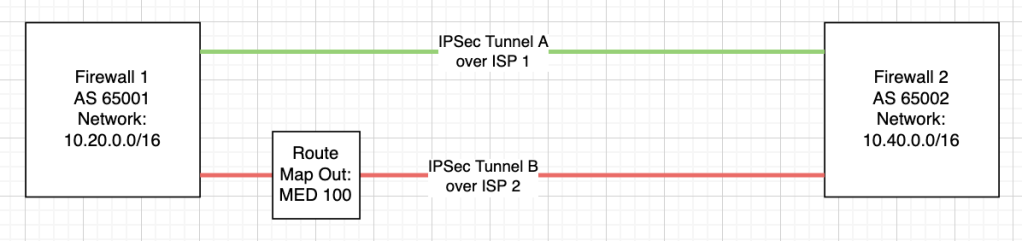
As an example, you could imagine a FortiGate with two VPN tunnels to the same destination AS, underlaid by different WAN circuits. If you’d like to steer traffic over the primary ISP (ISP1), you can set ISP2’s MED value to 100, higher than the default value of 0.
More about MED
- MED is not a transitive property, meaning when it is received by a node, it is not passed on to other peered nodes.
- The MED attribute in BGP is only compared between routes received from the same autonomous system (AS).
- You can however, force BGP to compare MED attributes on routes received by different AS’s by configuring the following setting:
config router bgp
    set always-compare-med enable
end
- You can however, force BGP to compare MED attributes on routes received by different AS’s by configuring the following setting:
 Fortinet NSE8/FCX Certification
Leave a comment