Category: NSE8 Blog

  • NSE8 – Blog 8 – Routing Week 3

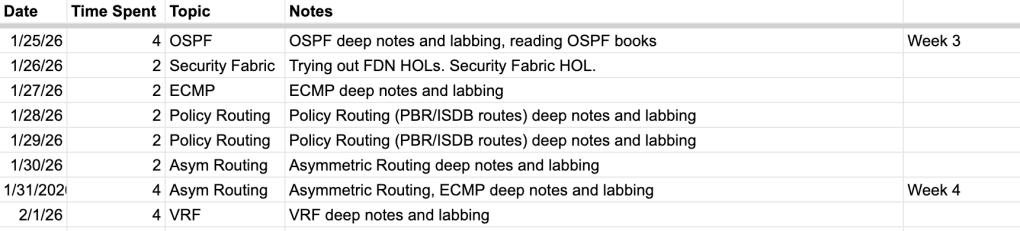
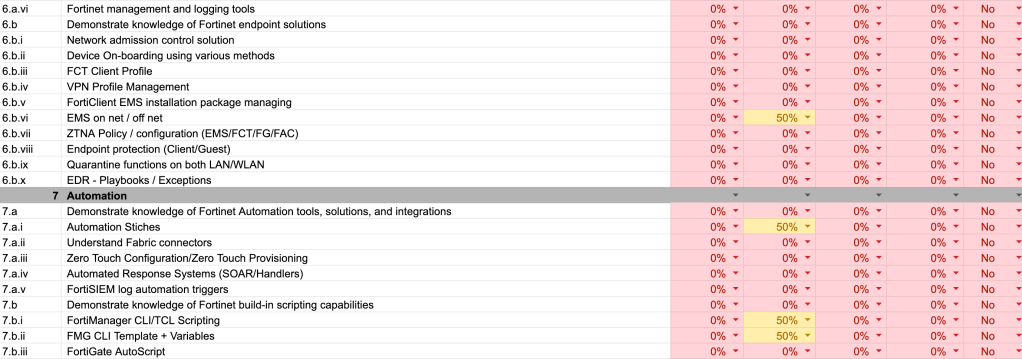
    Beginning of week 4 studying for core. Let’s start with the tracker:

    This past week I finished up OSPF and moved to ECMP, Policy Routing (excluding SD-WAN), asymmetric routing, and VRF and route leaking.
    ECMP and Policy Routing are both fairly straight forward and intuitive. The deep notes and basic labbing for both of these topics only took a day each – at least working through the existing Fortinet documentation and working with AI to identify gaps in my notes and some common situations to lab out. I did end up coming back to ECMP on Saturday for a bit more lab time.
    Asymmetric Routing was not as breezy but it taught me a lesson that’s already paying off. I’ve been working with an enterprise network with asymmetric routing enabled for the past year or so, and I’ve also learned about its mechanics while studying for previous Fortinet certs, but I hit a weird spot when I first began the deep notes. It was a weeknight so I only had a 2 hour study session, but I noticed that at the end of the session I still didn’t actually understand how asymmetric routing was treated by the FortiGate. Between RPF check understanding, asymroute vs auxiliary session, TCP without SYN, and the various articles explaining what asymmetric routing looks like in debugs and sniffers – I couldn’t fit all the pieces together. There was simply too much I did not yet understand; and at the end of the session I felt the disconnection and quite overwhelmed.
    The next day, Saturday, I had a full 4 hours for asymmetric routing. I still felt overwhelmed and confused quite a few times, but the feeling subsided as I continued to spend time working through the topics. First I made sure I understood RPF check – why asymmetric routing breaks traffic flows on FortiGate. Then I read Reddit threads, forum posts, and blog posts to get an understanding of how different people deal with asymmetric on their networks. I slowly began to understand the difference between asymroute, auxiliary sessions, and TCP without SYN – and when to actually use them rather than just how to configure them. The pieces began fitting together. Just like a big jigsaw puzzle (my girlfriend and I have been doing a lot of them lately), the more pieces you have fit together, the easier it becomes to fit the rest. It’s always the most difficult when nothing is yet connected. The best thing you can do is simply start with the edges or a little section, then add another little section, and on and on.
    This lesson has already become relevant as I begin to take on VRFs and Route Leaking. I spent four hours on it today and at the end of each hour, as I hit the restroom or took a five minute break, I felt that overwhelming feeling again of there being too many pieces not put together. I even felt inclinations to entirely skip the topic each time I read a thread or article suggesting that VDOMs are preferred to VRFs or Route Leaking isn’t recommended in modern networks. However, I know that both topics are listed at least once in the NSE8 topic outline so I have to push through. I know that just like with asymmetric routing as long as I continue working to understand the subtopics, understanding will come.

    Quick Lab Update

    A couple quick comments on the lab environment:
    1) In order to lab out ECMP I ended up having to upgrade the two FGT VMs from B1s to B4s as B1s only supports 2 vNICs and I needed another outside vNIC to create a secondary tunnel between the FGTs.
    2) I do know that my Azure environment is still in the first ~12 month period that allows for an allotment of low-limit free resources. This ends for me in August so I expect all costs to bump up a bit after that. If I stay on my estimated schedule of 12 months I should only have to bear the higher costs for about 4 months.

    That’s all I have this week. I’ll have more details next week when we begin wrapping up deep notes for the routing section overall and begin the review and additional labbing phase. That will likely last a week and set us at 6 weeks total for routing, right on schedule. I’m already exited to finally experiment with both ADVPN and ZTNA as we move into our second section, VPN and Overlays. Cheers!

  • NSE8 – Blog 7 – Routing Week 2

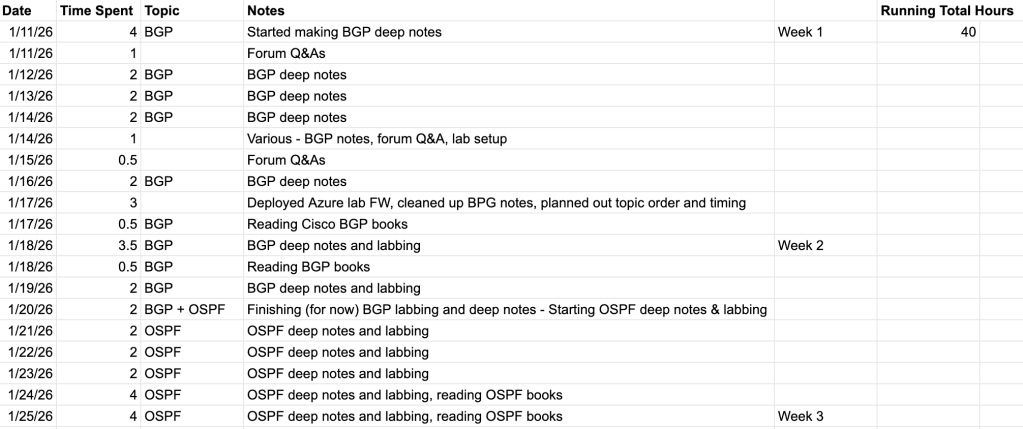
    We’re coming up on the beginning of the third week of studies. We’ll start right up with the updated time tracker.

    As you can see, we finished up BGP deep notes and labbing in about 1.5 weeks. To clarify, that is only dedicated study time. I just finished up reading the BGP sections of some CCIE books and do plan on reviewing BGP in a month or two. I also work with it every day at work so I don’t imagine I’ll become terribly rusty. My main concern is forgetting specific settings and configurations that I don’t use on the daily. I still haven’t broken out the Anki flashcards but think they could come in handy later in this process, just to stay fresh on definitions and use cases.

    OSPF has not been bad at all. For background, I have not used or even touched OSPF in a production environment. I configured it in Cisco labs for CCNA and then studied it briefly for both CCNP and FCP/FCSS. It took me a couple of labbing hours to really crack its code in terms of actual configuration but as soon as I brought up the first adjacency and began turning things off and on and turning dials I really became comfortable and the subtopics quickly clicked. I’m sure I’ll repeat this many a times, but I can’t emphasize enough how helpful labbing is in terms of quickly understanding topics.

    Lab Resources Update

    I finally have an update on the questions I listed in the previous blog post. Unfortunately, but as expected, the resource I spoke with didn’t have a ton of definite answers regarding version coverage (only 7.6 vs 7.4+7.6, etc.) on the exam. I learned that Fortinet stays pretty tight lipped even internally when it comes to NSE8/FCX. My AM and SE really just worked off of the same Pre-Release Notes that are publicly available, and the SE provided some context based on his experience with the NSE8 back when he took it.

    The most important things I got out of my meeting with the Fortinet team were Fortinet Developer Network access and the ability to request of evaluation VM licenses. I have logged into FDN at this point and browsed through the Hands-on-Labs but have yet to dive into them as there aren’t yet any covering routing. The labs I have access to with my FCSS cert mostly cover specific Fortinet services like SD-WAN, ZTNA, FortiNAC, etc. – which makes perfect sense. I’ll be sure to dive in soon. Regarding licenses, I request some FGT, FMG, FAZ, and FortiAuthenticator license as those are the products covered within the NSE8 Core module. When I get to the Secure Networking module I’ll be sure to request FortiNAC, FortiClient EMS, and FortiSandbox.

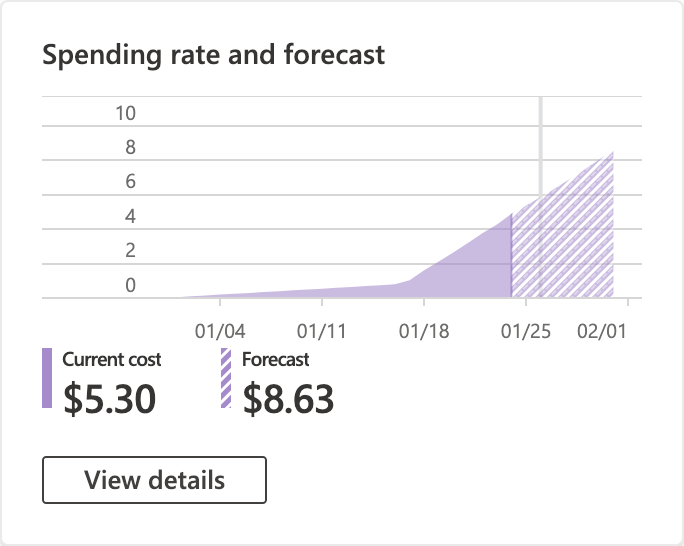
    It’s important to me and my journey so I want to be sure to occasionally include the cost of running my lab. So far I’ve done everything with the two PAYG FGT VMs in Azure, but as their 30 day trial runs out, additional VMs are spun up, and evaluation licenses are applied, this will certainly change. Hopefully tracking all of this will help somebody out their when they consider whether to invest in server hardware to do everything virtual.

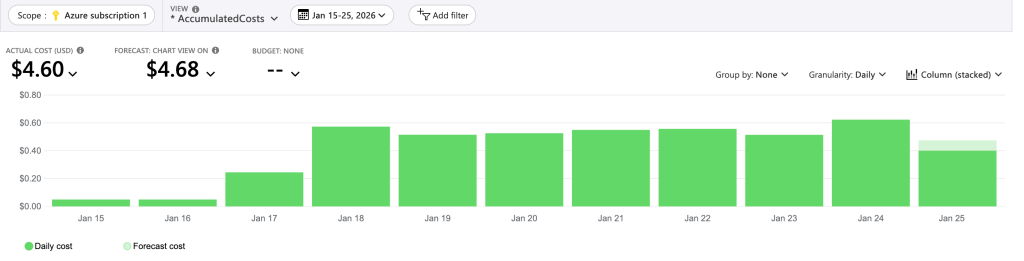
    Running the two VMs about 18 hours a week, we’re averaging close to $0.50 a day. I think I’m keeping things cheap by running the smallest VMs possible and being vigilant about turning the VMs down after the end of each lab session.

    Ending Thoughts

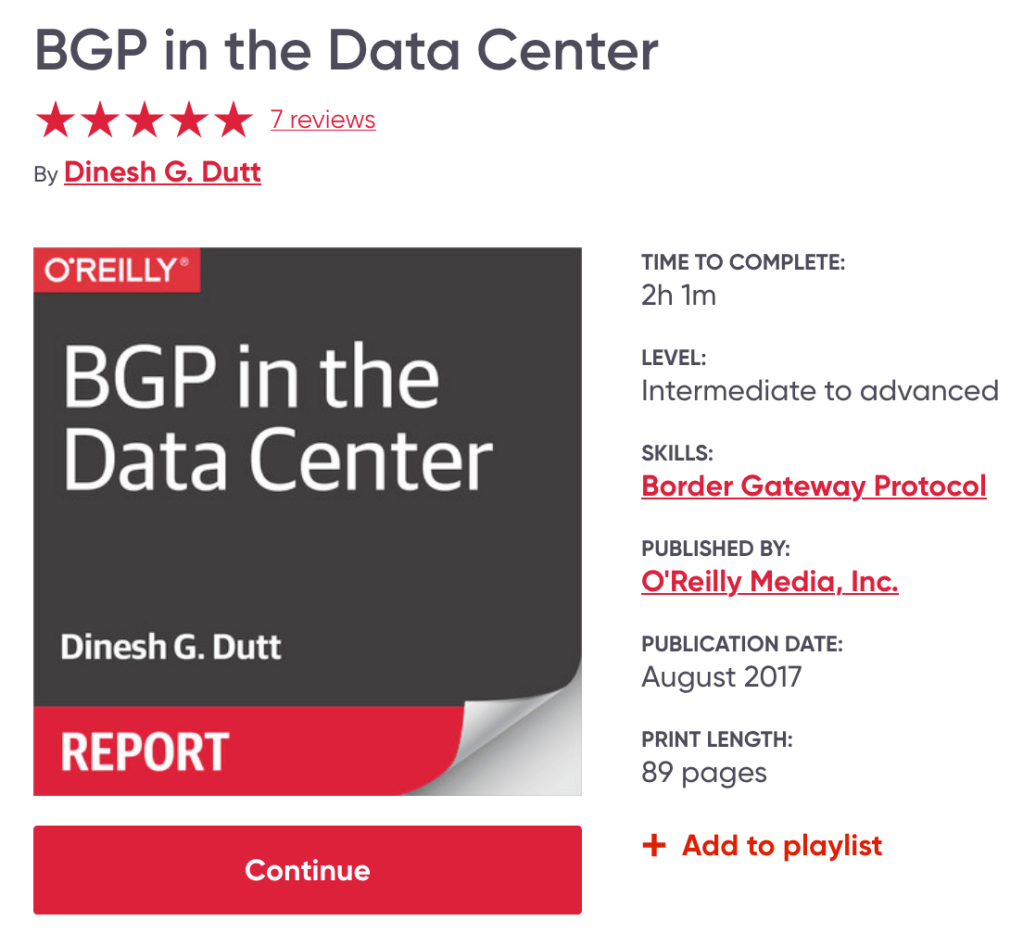
    I don’t want every one of these blogs posts to be essay-length like the last one, but do I want to be sure to include anything I’ve experienced that may be helpful to the next person so I’ll end by including a quick read I found interesting on BGP: BGP in the Data Center by Dinesh Dutt

    You have to sign up for an O’Reilly account to read it, but you can read it for free for the first 10 days via a preview account. It’s only about 90 pages total and provides a really good insight into how BGP is used at the hyperscale level.

    Thanks and see you next week!

  • NSE8 – Blog 6 – Routing Week 1

    Good morning, network nerds! Welcome to Routing Week 1!

    We made a lot of good progress since my last post. I have a lot of good structure built out in my study plan and some great resources, at least to get started with. Something you’ll learn as you follow this series is that I have a pretty terrible recall memory. This leads me to writing down and documenting everything in my life that I actually want to remember. This is also why my girlfriend gets regularly peeved at the fact that I can’t remember what food we have in the fridge or pantry (I don’t write that down). At work I have upwards of a dozen small lists and sticky notes on my desk to accompany my ever expanding archive of what I’ve coined “network information documents” – or simply notes documenting anything from BGP ASs to known services to learned fixes. All of this to say: we’re going to reference the NSE8 Tracker spreadsheet a lot.

    The Study Timeline

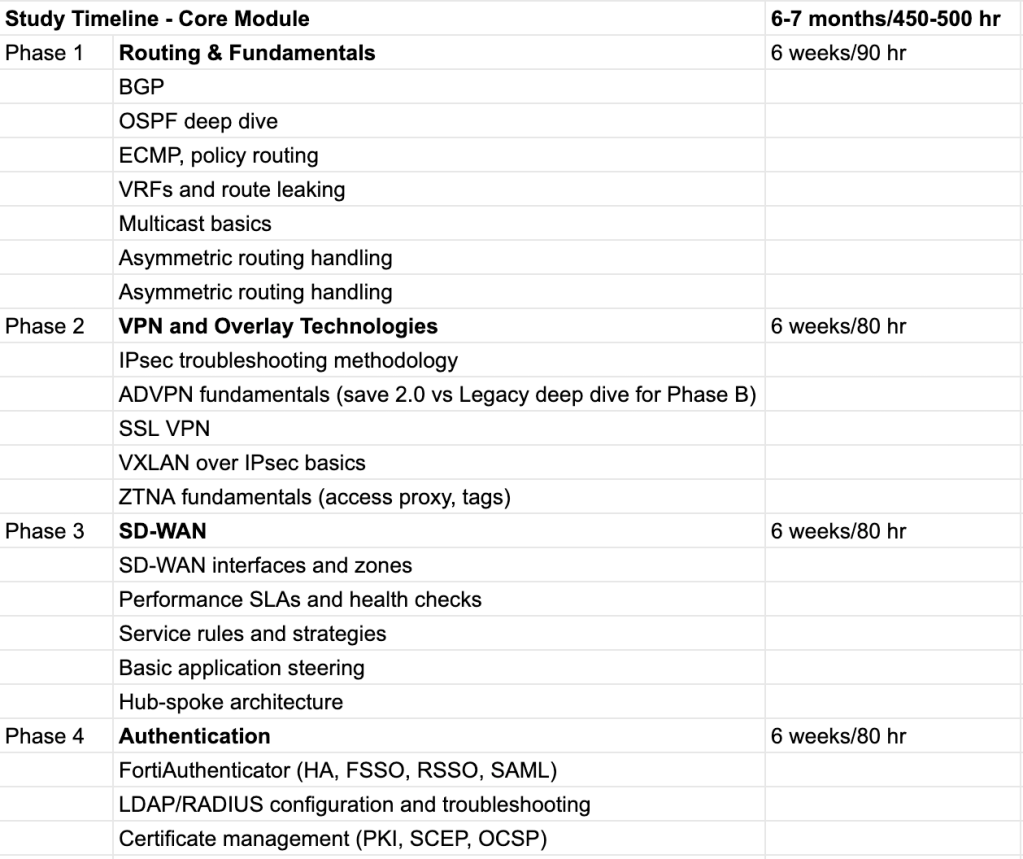
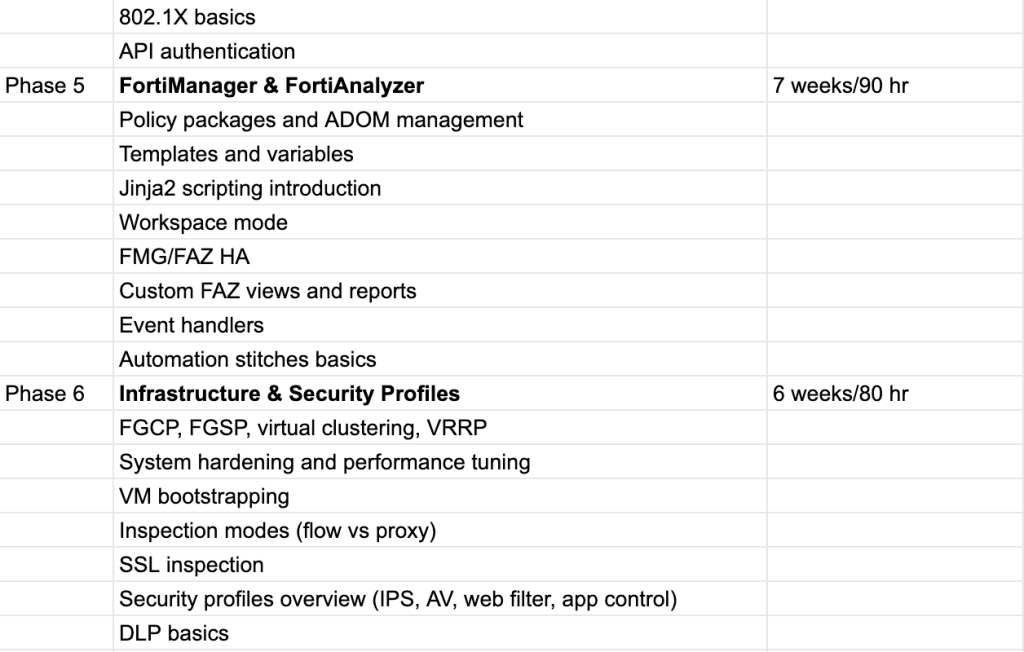
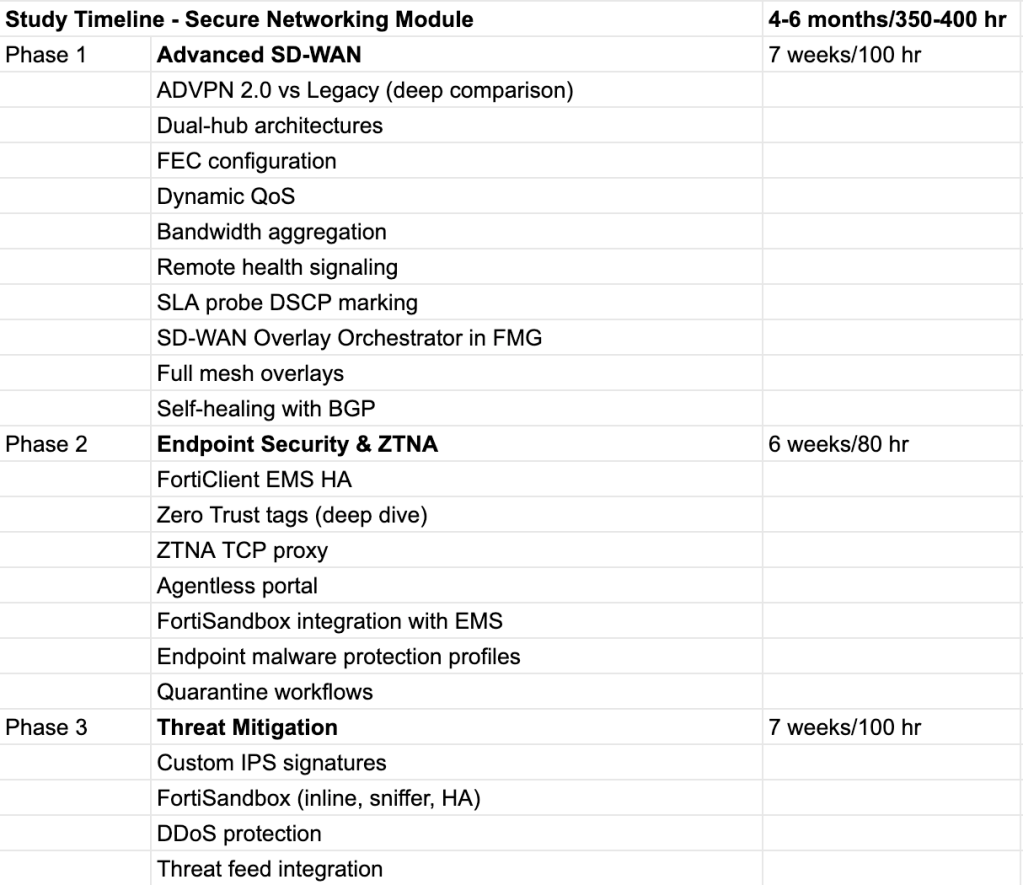
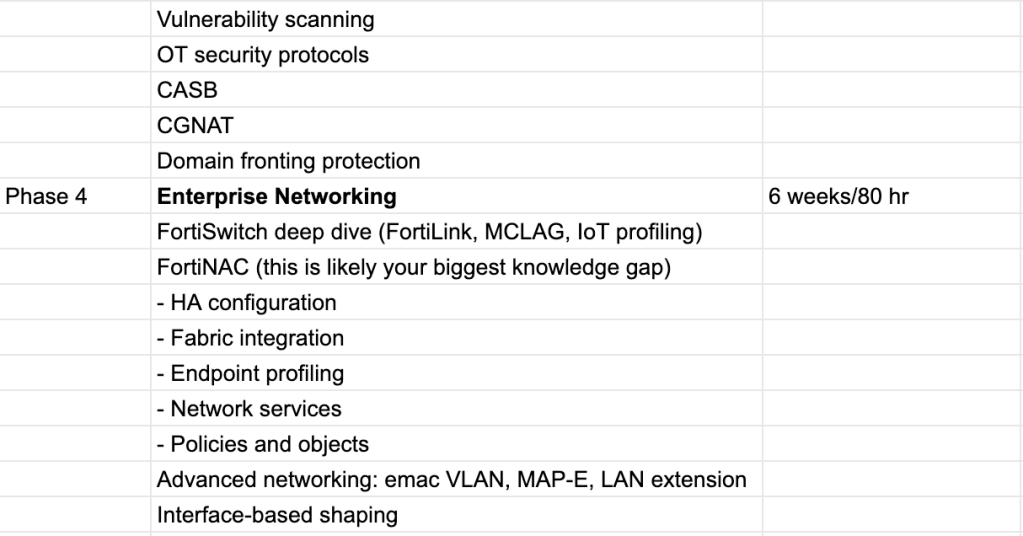
    First off, for background here, I created this outline with Claude AI. I gave it the NSE8 Pre-Release PDF, and some context on my available time per week and network experience. It produced these two timelines for the NSE8 modules. I certainly won’t be sticking to these exactly, but they provide a basic structure to go off of.

    The Lab (so far)

    If you read my first blog post you’ll know that I have a small FortiGate/FortiSwitch/FortiAP stack at home. Unfortunately this simply isn’t going to cut it for the NSE8. It was great for the FCP and FCSS, but there’s simply too many additional products (FortiManager, FortiAnalyzer, FortiClient EMS, etc.) to keep things remotely physical. Virtualization is required. The ability to quickly spin up additional FortiGate instances to act as routing or IPSec peers is already enough of a QoL boost to justify learning the bit of cloud or hypervisor skills required.

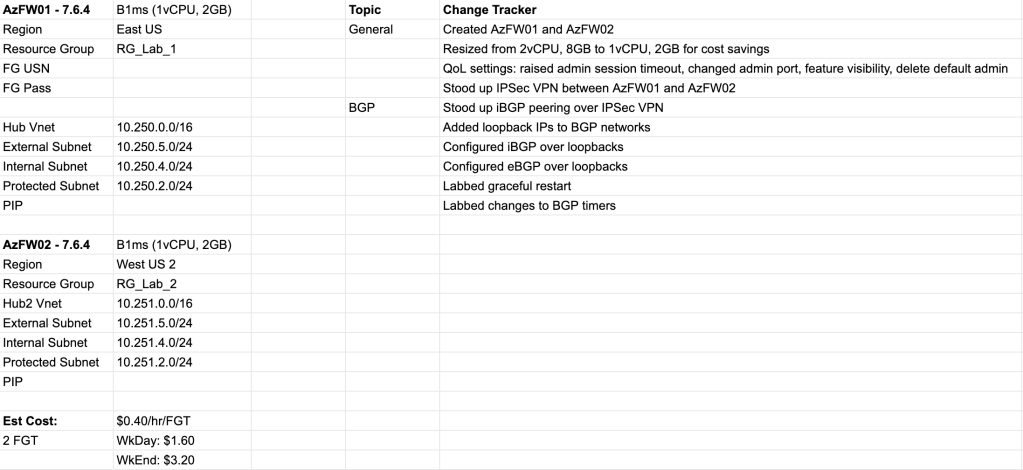
    To summarize the screenshot above, I stood up a couple of FortiGate VMs in Azure. I made an IPSec tunnel between them and started labbing out the BGP concepts I’ve been going deep on this past week. So far I’ve just been using the PAYG (pay as you go) licensing model for the FGT VMs, but I’m hoping to swap these with BYOL (bring your own license) versions once our Fortinet AM (Account Manager) finally responds to my email. Oh, that!

    On Monday, I shot an email off to our company’s Fortinet AM and SE (Sales Engineer) with a list of about 4 questions (see blog 4 for the list – it’s mostly specifics about FortiOS versions and past certs) and a request for some additional resources such as Fortinet Developer Network access and hopefully some evaluation licenses for all of the products included in the NSE8 syllabus. To be fair it was quite a few specific questions and asks… I’m sure they’ll get back this week. Until then I’ll stick with the PAYG, which is a maximum of 10 or 15 dollars a week with the 2 FGT VMs. I always make sure to shut these down after each lab session.

    Time Tracker

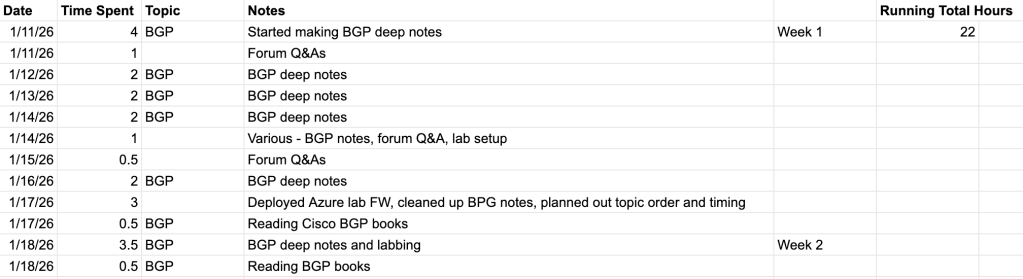
    I’m not sure if I’ll include these in each weekly blog post, but I do feel it’s personally valuable to know roughly how many hours I’ve spend on each topic. Another thing I’ve noticed about myself is that I have a problem with either going too shallow or deep on subjects (an extension of a general personality of extremes that falls outside of this blog’s scope). Documenting my time will give me a general idea as to whether I’m within range of my Topic Schedule. I also noticed that it keeps me more accountable with myself, just like this blog!

    Additional Resources

    To conclude I just wanted to mention a few additional resources that I may or may not have mentioned and have found valuable this first week.

    1. Claude AI – I’ve been using Claude Pro for about a year now for everything from gardening advice to career advice to vibe coding little dashboards for personal use. I used it extensively while studying for the FCS and FCSS, feeding it my typed notes to check for accuracy errors and knowledge gaps, as well as to create practice questions and practical scenarios. For the NSE8 I obviously used it for the Topic Schedule, but I’ve also been feeding it my BGP deep notes to check for accuracy and gaps and then asked it to provide me with different scenarios to lab out.
    2. draw.io – I use this to create all of my network diagrams. It’s easy to use, nimble, and most importantly, free.
    3. Google – This may be obvious, or not. The FortiOS administration guide isn’t enough, neither are the Fortinet Training site’s self-paced learning modules (like they were for FCS/FCSS). You have to reference Fortinet Community documents and Technical Tips. The best way to find these, I’ve found, is to simply search “fortigate [topic]”. For example, “fortigate bgp graceful restart”. Then I go through the first few pages and take notes on any and everything I haven’t learned yet. When I first start on a new subtopic I make sure to take notes but know that facts aren’t set in stone until I’ve either reviewed a couple corroborating sources or labbed it out myself. If you haven’t already, it’s also useful to quickly learn Google Dorking, which allows you to use Google better, simply put. Here are some quick tips on that:
      • Put double quotes around any term you want your search to match exactly. For example if you want to absolutely be sure that that your search includes the phrase “denied by forward policy check” (See first image below). This is extremely useful when searching for specific logs or error codes.
      • If you only want results from fortinet.com, include site:fortinet.com. (See second image).

    Thanks for reading, see y’all next week!

  • NSE8 – Blog 5 – For real this time

    After a couple of months of half-assed studying I finally sat and passed the AZ-104 exam this past week. With this as well as the start of the new year I can’t think of a better time to make the big push for the FCX/NSE8. As we get back into this topic I again cannot emphasize enough the help that the https://fcxstudy.group/ blog has provided in my short progress into this long journey thus far. My newfound enthusiasm can almost solely be attributed to this specific post: https://fcxstudy.group/2025/10/31/my-fcx-experience-kevin-guenay-nse8-003845/

    In the post, an Austrian Systems Engineer explains his journey to passing the FCX. Maybe it was the parallels I saw with my level of experience, or pure dumb optimism after reading about Kevin passing the exam after close to a year of hard studying (contrary to the other FCX experience blogs that often mention 1.5-2 years). Either way, let’s talk shop.

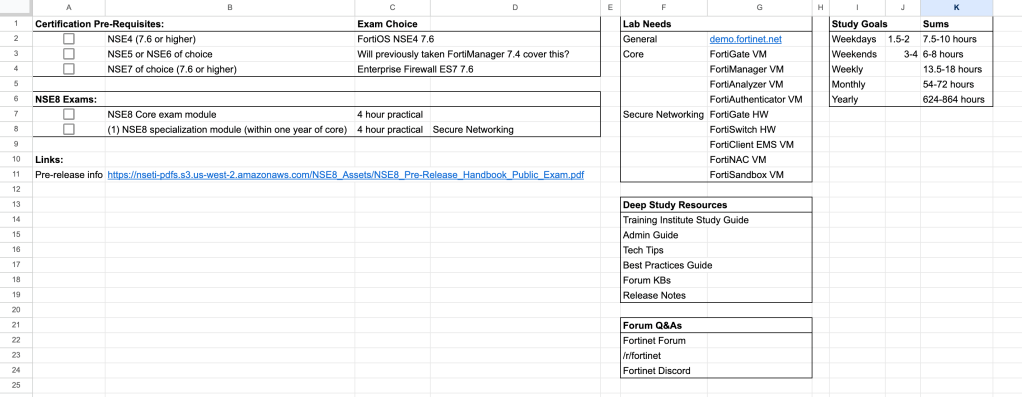
    I have recreated Andrew from fcxstudy.groups’s FCX Excel spreadsheet tracker. I started it from scratch but ended up in a similar format to what he created, and also borrowed his style of topic tracking – especially the “Teach Others” concept of learning. Let’s go through the tracker sheet by sheet and I’ll add any necessary color.

    Sheet 1: Exam Requirements and General Tables

    This is really just notes from reading through the NSE8_Pre-Release_Handbook_Public_Exam as well as lists of lab resources and a small table I can use to track total hours at my projected daily study rate (I still would like to get the yearly hour count up closer to 1000, but I started with a lower target in hope to not scare myself off).

    Sheet 2: Questions

    This is simply a list of questions I’d like to eventually have answered. Most answers will come from our Fortinet AM (Account Manager) and SE (Sales Engineer) at work. Kevin’s blog post also emphasized his use of the Fortinet Demo licenses and Hand-On-Learning labs, so one of my first tasks will be obtaining Fortinet Developer Network access from our AM.

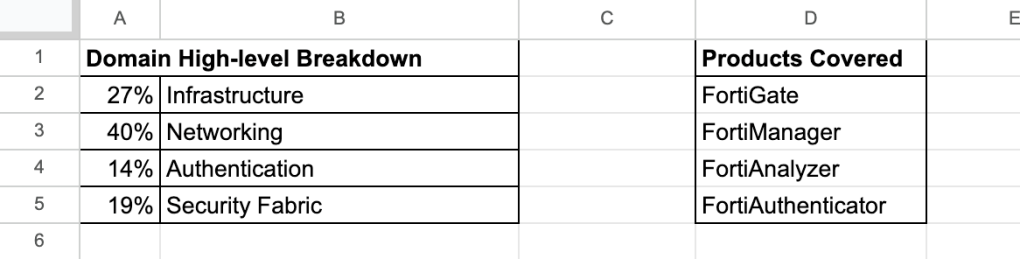
    Sheet 3: Core Module NSE8 High-Level

    The two tables likely don’t need their own sheet, but I’m fine wasting e-paper. Both of these datasets are extremely important, in particular to my interest, the products covered. This sheet and the next are specific to the Core exam module, the first of two 4 hour practical exams making up the new NSE8 format. This tells me exactly what kind of lab VMs I need as well as what high level scope I can set in terms of studying resources. Personally, I love that products like FortiMail and FortiADC have been kicked off the syllabus. I personally do not have any experience with these and likely won’t in the near future so the more this exam version focuses on products I have experience with, the better.

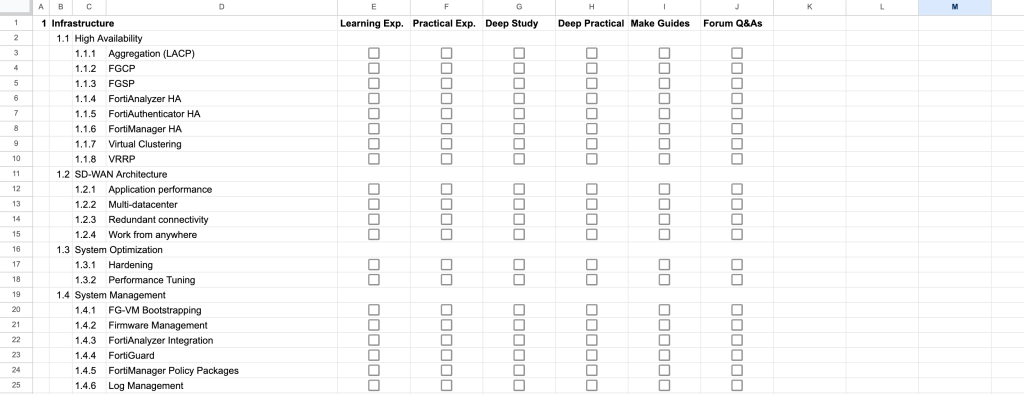
    Sheet 4: Core Module Topics

    This is the meat and potatoes of the tracking spreadsheet. The list of topics was pulled directly from the NSE8_Pre-Release_Handbook_Public_Exam and will be updated accordingly if there are any changes once the production handbook is released. Let me explain the checkbox columns since I’ve labeled them for brevity:

    • Learning Exp. (Experience): Do I have experience learning about this topic? This would likely come from studying for the FCP, FCSS, or the month or so I started studying for the FCX.
    • Practical Exp. (Experience): Do I have practical experience working with this topic? This would likely come from work experience at my day job or from lab experience during FCSS or FCX studying.
    • Deep Study: Have I spent days to weeks reading through written material, admin guides, handbooks, KBs, etc. about this topic?
    • Deep Practical: Have I simulated this topic in the lab? Have I simulated troubleshooting scenarios?
    • Make Guides: Have I made a guide teaching others about this topic? This is something I tweaked based on Andrews original “Teach Others” learning technique. I like making MOPs and KBs for generic troubleshooting of Fortinet equipment to be shared at work, and it’s probably the best way to passively teach others without becoming the office know-it-all. I used this method quite a bit when studying for the FCSS.
    • Forum Q&As: Have I answered questions on Reddit, Fortinet Forums, Discords about this topic? Once I’ve checked this and Make Guides, I really know I’m confident on the topic.

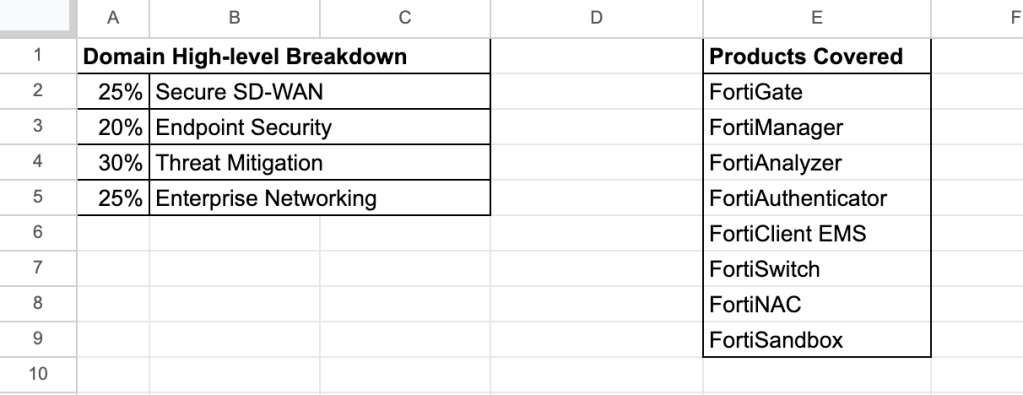
    Sheet 4: Secure Networking Module High-Level

    Same as the Core high-level sheet, but for the Secure Networking module, my choice of the 3 specified exams one must pass to complete NSE8. I chose Secure Networking as it best aligns with my current experience as well as my personal interest in the pure networking domains. This is also the “logical continuation” of the core exam.

    Sheet 5: Secure Networking Topics

    Same as the Core module topics sheet, but for the Secure Networking topics.

    I’ve set a recurring reminder in my phone reminding me to make a blog post/update every week. I highly doubt that will actually happen, but the idea is that it will remind me to stay true to my daily and weekly studying hours goals. I think it makes more sense to create these posts when I have enough material updates to warrant one. Hopefully the addition of FDN (Fortinet Developer Network, includes Demos and Hands-On Learning Labs), and some evaluation licenses from our AM will provide that content.

  • NSE8 – Blog 4 – An Update

    It’s been a couple of months, I imagine, since I’ve provided an update regarding my FCX journey. In the style of the last update, things have again pivoted.

    I have spent the better part of the last two months focusing on Azure. The only reason for this being the current project I have been assigned to at work – to build out a new failover design for a client’s redundant FortiGate hubs. I’ll speak about this briefly, since it’s what I currently know about and we ran into some interesting issues that I wasn’t able to find quick solutions for via Google, Fortinet forums, or AI.

    The client has two FortiGate hubs, acting as termination points for their ~40 spoke sites as well as somewhere between 50 and 100 vendor and partner B2B IPSec tunnels. The simple (not so simple) ask, is to allow for proper failover for VMs living in Azure from Region 1 to Region 2. The failover itself is handled by other engineers. It’s my task to build the network pipes to support this new traffic pattern. The design we all put out heads together and came up with is almost rudimentary: An upgrade to a pair of HA FortiGates in Region 1, where the single FortiGate hub currently lives. Traffic will always flow out of this FortiGate from the Azure resources when it’s up (steady state). When individual VMs or resources failover from Region 1 to Region 2, still traffic flows to the Azure HA FortiGates in Region 1, across the peered regions. When all of Region 1 fails, Azure will failover via Azure Site Recovery into Region 2 and (now that the Azure HA FortiGates are down with Region 1) traffic will flow out via an ExpressRoute to the secondary FortiGate hub, living in an on-prem datacenter. It’s almost too much of a bruteforce to even work, but it passes all of the tests and costs less than the first design – one Azure FortiGate in each region, causing LOTS of IP design complexity for our infrastructure and systems teams.

    We ran into numerous issues, none of which proved to be a detriment to the design, but plenty that strained brains for days on end. Particularly when we decided it would be a great feature to have the ability to terminate IPSec tunnels to both the External Load Balancer (part of the standard FortiGate HA design, provided by Fortinet docs) and a Global Load Balancer in front of the ELB, simultaneously. Looking back at the 3-4 week long build, that was probably the biggest headache, next to hitting enough combinations of check boxes to finally get BGP to peer across IPSec when terminating to our ELB.

    As to not make this a dissertation, and without enough visuals, screenshots, and notes that I’d want to include for the privacy of the client, I’ll leave it at that. As an Easter Egg, you may be able to find one or two Fortinet forum posts I made while working on this build.

    I’ve learned a lot in the past couple of months. Unfortunately for the FCX (now NSE-8 again, I guess) of this blog, most of it was directly related to FortiGate builds and quirks in Azure. It definitely provided a deep dive and great hands-on experience for the cloud sections of the FCX, but unfortunately I’m sure I’ll need to come back and cover a broader scope to truly cover that domain.

    With the official cutover to the new Azure build coming next week, it will be nice to put this in my pocket and move forward with the rest of the Fortinet work planned over the ~6 months. Again, in regard to work, I’ve got quite a bit of Security Profile, Security Fabric, FortiManager, and best practices implementation in the pipeline – tasks and hours that will better align with the scope of the NSE-8.

    As an informal update to the previous style of this blog, I must mention what I’ve been using to study, even though it’s not Fortinet. I’ve followed John Savill’s YouTube playlist for the Azure Fundamentals certification, and completed the cert. I’ve also followed his playlist for the AZ-104 Azure Administrator certification, which really goes much further than the cert requires, almost acting as a mini-Azure-masterclass in about video 24 hours. I’ll likely sit that cert in the next couple of weeks. To follow I imagine I will either take a few weeks to study and sit the AZ-700 Network or dive right back into reviewing complete Fortinet Administration Guides for FortiOS, FortiSwitch OS, FortiManager, and FortiAnalyzer and I work my way through the next 6 months of work projects. I will say that’s a lot of looking ahead for the guy that’s pivoted twice since starting this blog. The next post will surely explain better.

  • NSE8 – Blog 3 – Already pivoting strategies

    Monday – back to work. Yesterday I fit a good 3 or so hours of studying in between the coffee shop and common area on the first floor of our apartment building. Later in the day, after finishing the Study Guide for Fortinet Azure Cloud and beginning to pull up the newly released SD-WAN Core 7.6 guide, I realized I’m at the point where I’m going to begin reading material I’ve already studied. Time for my first pivot (there’s going to be a lot of these, it’s part of my personality).

    I’ve decided to take a break from reading and taking notes on the study guides, and instead do the same for the FortiGate 7.2.11 Admin Guide. There’s a couple of reasons for this:

    First, this better aligns with my current project at work, which is building out branch FortiGate configs from scratch while implementing Fortinet best practices. At the same time I plan on using this knowledge as a baseline for the MOPs (Method of Procedures) I will create a bit later in my process. I will create MOPs to both assist in my studying process (learning via teaching) and aid our help desk in support of the enterprise network at work.

    Second, I don’t want to go and study the Study Guides for technologies such as FortiMail, FortiADC, FortiSandbox, or any of the software that I don’t currently have experience in, until I get closer to having a lab fully set up for these. The timing of the lab setup is going to be a big limiting factor in regard to progress in these, and many other, areas of study. I only expect to receive complimentary lab licenses for many of these products for a span of 3-8 months, so I want to make the absolute most of my time with them and time it right in terms of when I take both the written and practical exams.

    This all leads to a more overarching point that I’ve realized. I should focus on what I’m using now at work (and what I have access to at in my homelab) before I move to the technologies I need trial licenses for. What does this mean practically? I will be spending at least the next 2-4 months focusing primarily on the FortiGate, FortiSwitch, FortiAP, FortiManager, and FortiAnalyzer platforms. Narrowing my focus will allow me to do deep learning on subjects such as best practices implementation, SD-WAN design, routing, and advanced troubleshooting. These are all skills that I can always get better at and will directly improve my quality of work. Once I’ve exhausted these base products, I will begin to shift in the direction of the products I haven’t, or don’t often, work with.

    I’ll end with what’s been on my mind. Reading about peoples’ FCX/CCIE/JNCIE study experiences, I understand that it’s necessary to complete anywhere from 1000-3000 hours of studying. How does the math work out to completion in roughly 2 years, as many report? That averages to somewhere around 20 hours a week, or 3 hours a day. How will I rearrange my life to allow for 3 hours of studying a day? Will I do 90 minutes a day on weeknights and 6+ hours on both Saturday and Sunday? Or will I start doing an hour in the morning as well as the usual 90 minutes a weeknight? Lots to consider, but certainly the most important thing is keeping up with my current routine of studying every single day.

  • NSE8 – Blog 2

    It’s a Saturday, which is usually a study day. I’d like to get all of the background information for this blog out of the way pretty quickly so I can focus on simply documenting my daily/weekly steps and progress.

    Let’s start with what I have so far in terms of discovery of resources. Here’s the summary: there isn’t much. The best that I’ve found so far is actually another blog called fcxstudy.group. I will be using his tracking spreadsheet and a fair amount of his advice is being followed in terms of my lab structure, or what will eventually be my lab structure. The most important pieces are is his FCX Study Tracker, which can be found here: FCXStudy.group Study Tracker and his lab topology and resource chart, here: FCXStudy.group Lab Exam Part 2

    I read through his whole blog (there’s only about 6 or so articles that pertain to the FCX exam). I then downloaded the study tracker and started marking off some of the topics, based on what I’ve studied either in preparation for the FCP and FCSS, or simply while do independent studying. Here’s what I have today:

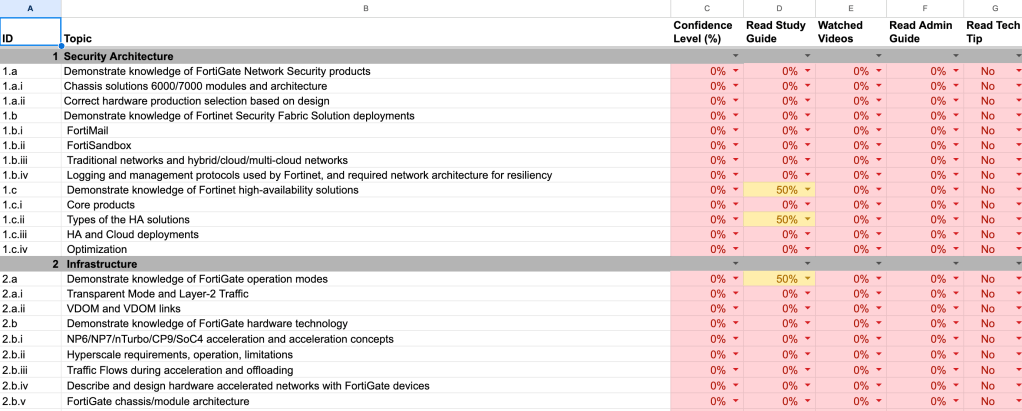
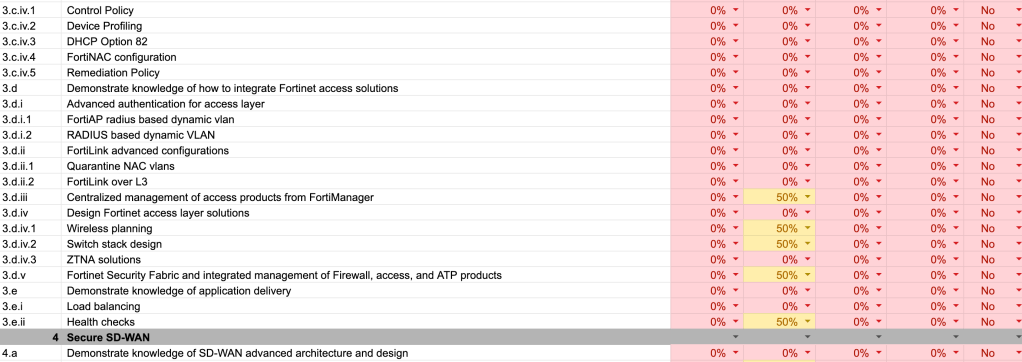
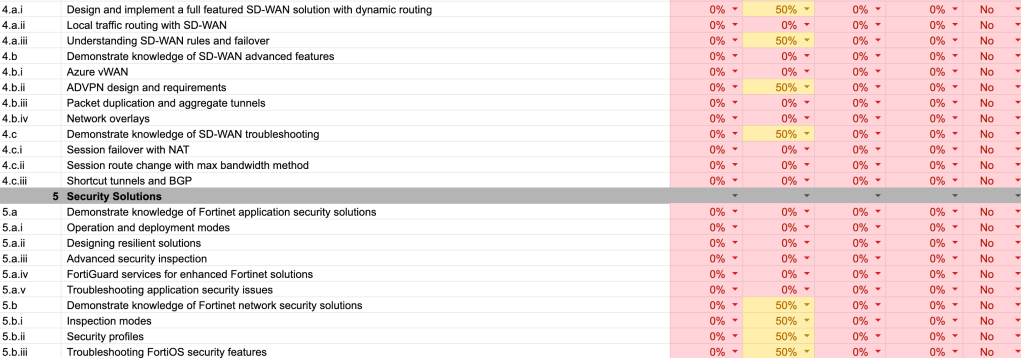
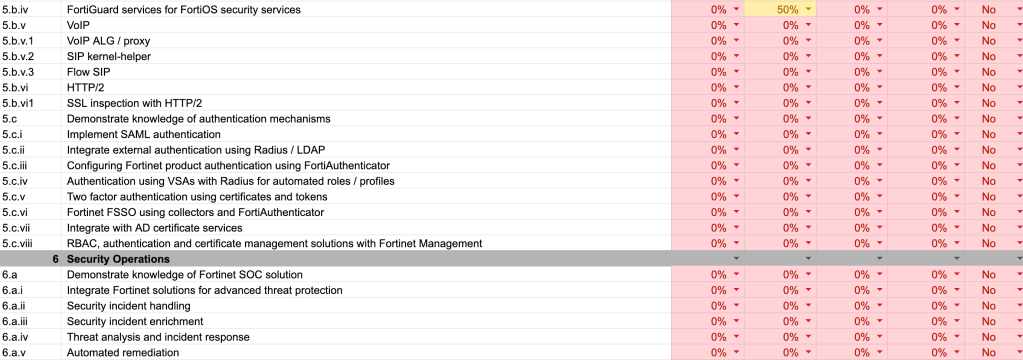
    As you can clearly see, I’m just about starting from zero. I was a bit strict with myself in terms of what I considered to be reviewed thus far, but we’re still I’d estimate somewhere in the low single digits in terms of percentage of confidence and readiness for the written exam (there’s a whole other spreadsheet page for the lab/practical exam).

    If anything, I think being in this position is favorable. It means I have a lot of options in terms of what I can focus on first. I don’t have to start with topics that I have little practical interest in and can have some fun with these first few months. I’ve marked each of the topics in the chart above as 50%, rather than 100%. These are the topics that I’ve spent a fair amount of time covering in preparation for previous exam, or topics that I regularly work with in my day job.

    Yes, my day job, I’ve yet to mention this. I currently work for an MSP (Managed Service Provider), wearing a network engineer’s shoes. I primarily work with a single customer, who has a medium-sized enterprise network, utilizing Fortinet equipment almost all the way up their stack, from Datacenter and Azure FortiGate firewalls, to site/branch FortiGate firewalls, edge and access FortiSwitches, and FortiAPs. We also utilize FortiManager, FortiAnalyzer, FortiClient EMS, and we’re now introducing FortiExtenders. The FortiGates are currently running in the 7.2 FortiOS series.

    Back to exam prep. My current phase of studying is working through all of the Fortinet Training Institute’s Study Guides. At this time I’m just reading though them and taking notes, occasionally testing out new learnings either in my homelab stack or in the work stack. I plan on continuing this until I run out of Study Guides to take notes on. I’m really just trying to get a grasp of high level concepts and “laying eyes” on more detailed or advanced topics that I’ve yet to touch in a practical environment. Here is a full list of the lessons currently available within the Fortinet Training Portal, that I find applicable to the FCX:

    FortiGate 7.4 – Completed during FCP study
    FortiManager 7.4 – Completed during FCP study
    FortiAnalyzer 7.4 – Completed between FCP and FCSS study
    FortiSwitch 7.2 – Completed in preparation for a NAC implementation project at work
    FortiClient EMS 7.2 – Completed in preparation for work tasks and troubleshooting
    Enterprise Firewall 7.4 – Completed during FCSS study
    Network Security Support Engineer – Completed during FCSS study
    SD-WAN 7.2 – Completed
    Secure Wireless LAN 7.4 – Completed
    Secure LAN Edge 7.6 – Completed
    Azure Cloud Security 7.4 – In progress
    FortiAuthenticator 6.5
    FortiNAC 7.2
    FortiMail 7.4
    FortiWeb 7.4
    FortiSIEM 7.2
    FortiSandbox 5.0
    FortiSOAR 7.3
    FortiEDR 5.0
    SD-WAN Core Operations 7.6
    SD-WAN Large Deployment 7.6
    Public Cloud Security Architect 7.2/7.6
    FortiSASE 25
    Security Operations 7.4

    Now that I’ve typed all of those out I’ve realized how much time I’ve spent writing this post, which is valuable time I could use for studying. I’m off to the coffee stop to keep pushing through the Study Guides.

  • NSE8 – Blog 1

    It’s July of 2025. I’m one month past finishing the Fortinet FCSS and FCP certifications and just about 2 years into working with Fortinet gear. There’s a small physical homelab sitting under the TV in the living room, hosting the apartment’s WiFi and a wired connections for an Xbox One. I’ve decided to begin studying for the Fortinet NSE-8 exam.